







In a significant update, YouTube is set to enhance the viewing experience on its TV app, bringing a series of new features aimed at improving user navigation and accessibility. The update, which has begun rolling out on smart TVs and streaming devices such as Apple TV, promises a smoother and more intuitive interface, as confirmed by the company’s announcement.
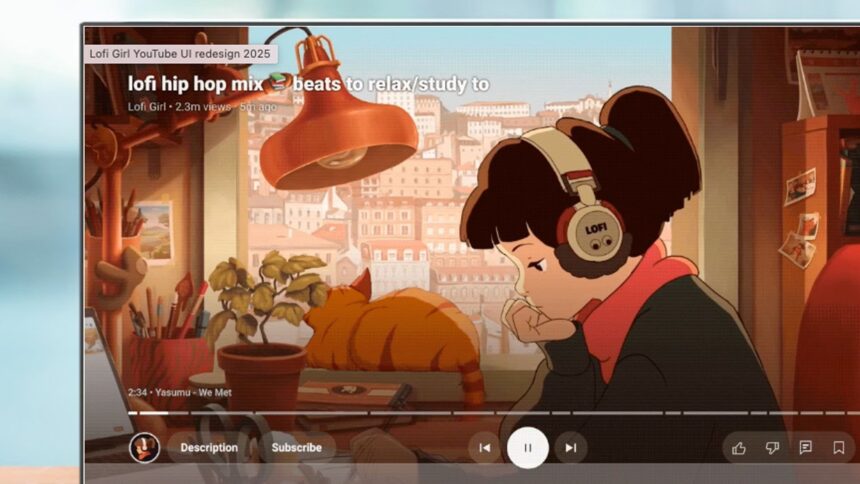
Among the most notable features is a reorganization of the control layout on the watch screen, which now separates functions into three distinct sections beneath the video scrubber. On the left side, users will find controls for the channel, description, and subscription; in the center are the typical playback options—previous, pause, and next; while the right side features controls for liking, disliking, commenting, saving, enabling closed captions, and adjusting settings.
In a move that alters the video viewing layout, video titles have been relocated to the top left corner of the player screen and are no longer clickable, making way for an updated Description button. This new feature, situated to the left of the playback controls, replaces the clickable video titles and provides essential information about the video, including creator details, metadata, and a preview of comments. Additionally, it offers quick access to video chapters, which enhances the user experience for those looking to navigate through content efficiently.
The Subscribe button has also received an upgrade; it remains visible throughout playback and is now distinct from the channel thumbnail, reducing the number of clicks needed to subscribe while watching a video. This button is designed to adapt according to your subscription status, indicating whether certain content is behind a paywall and enabling the option to set notifications for upcoming live streams.
For sports enthusiasts, the update introduces a Multiview control for those watching live games, providing a more dynamic viewing experience. Music and Premium subscribers will have access to a new Display Mode control as well. While Google had previously hinted at expanding Multiview to non-sports content, this specific enhancement has not yet been included in the current update.
While the changes may not be revolutionary, they represent a thoughtful refinement of an interface that has been in need of modernization. These updates also align the YouTube TV app more closely with its mobile counterparts, promoting a consistent user experience across platforms.
As these enhancements roll out, users can expect a more streamlined interaction with the app, making it easier to navigate through content and connect with creators.